
Convert presentations to structured Markdown
Slides hold a lot of structure that plain text loses. Scan Hero converts PPTX, PPT, and ODP decks into Markdown with one section per slide — diagrams and colour blocks become tables and lists, and formulas and metrics are kept intact.
Only have slide images? Export them as PNG and Scan Hero will read them with Claude Vision.
Example: Presentations → Markdown (.md)
Slides with diagrams, matrices, and formulas become structured Markdown—one section per slide, layouts and metrics preserved.
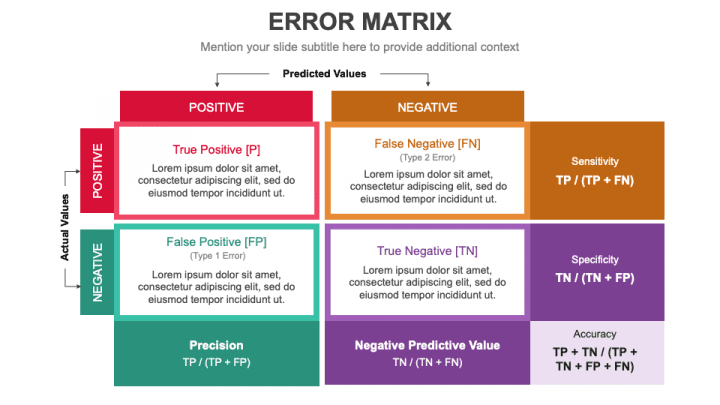
Slide metadata
| Field | Value |
|---|---|
| Slide | 1 |
| Title | ERROR MATRIX |
| Subtitle | Mention your slide subtitle here to provide additional context. |
| Layout | 2×2 confusion matrix + metric formulas |
Confusion matrix (extracted)
| Predicted positive | Predicted negative | |
|---|---|---|
| Actual positive | True Positive [TP] | False Negative [FN] (Type 2 Error) |
| Actual negative | False Positive [FP] (Type 1 Error) | True Negative [TN] |
Metrics (formulas)
| Metric | Formula |
|---|---|
| Sensitivity | TP / (TP + FN) |
| Specificity | TN / (TN + FP) |
| Precision | TP / (TP + FP) |
| Negative predictive value | TN / (TN + FN) |
| Accuracy | (TP + TN) / (TP + TN + FP + FN) |
Sample output
## Slide 1 — ERROR MATRIX

*Mention your slide subtitle here to provide additional context.*

### Confusion matrix

|  | **Predicted positive** | **Predicted negative** |
|--|------------------------|------------------------|
| **Actual positive** | **True Positive [TP]** | **False Negative [FN]** *(Type 2 Error)* |
| **Actual negative** | **False Positive [FP]** *(Type 1 Error)* | **True Negative [TN]** |

### Performance metrics

| Metric | Formula |
|--------|---------|
| Sensitivity | TP / (TP + FN) |
| Specificity | TN / (TN + FP) |
| Precision | TP / (TP + FP) |
| Negative predictive value | TN / (TN + FN) |
| Accuracy | (TP + TN) / (TP + TN + FP + FN) |How it works
- 1
Upload your file
Drag it into the browser or send it through the REST API. See the credit cost before you convert.
- 2
Claude reads it
Anthropic’s Claude models extract and restructure the content — context-aware, not just raw OCR text.
- 3
Download clean output
Get exactly the format you chose, and refine it with an AI prompt in seconds if needed.
Frequently asked questions
How are diagrams on slides handled?
Confusion matrices, 2×2 grids, and similar diagrams are reconstructed as Markdown tables, while bullet content and formulas are preserved as lists.
Can I convert exported slide images instead of a PPTX?
Yes. Export slides as PNG or JPG and upload those; Claude Vision reads the layout and produces the same structured Markdown.
More conversions
Convert scanned invoices to structured JSON & Excel
Convert identity cards to a CSV row
Convert bank statements to Excel
Convert contract PDFs to editable Word
Convert Excel spreadsheets to Markdown tables
Convert handwritten notes and scans to text
Browse all conversion workflows, read the guides, or see the examples gallery.
Start converting in seconds
100 free credits on sign-up. No code, no card, no commitment.
Get started free