
Convert contract PDFs to editable Word
Legal and procurement teams need contracts they can actually edit. Scan Hero converts scanned or digital contract PDFs into clean DOCX files with section numbering, underline blanks, and checkbox options kept intact — so you can review, redline, and reuse without retyping.
Multi-page PDFs keep their page breaks and structure. Use the AI adjustment pass only to fix layout, never to change legal text.
Example: Contracts (PDF) → Word (.docx)
Scanned or digital contract PDFs become editable Word files—numbered sections, fill-in blanks, and checkbox options kept intact.
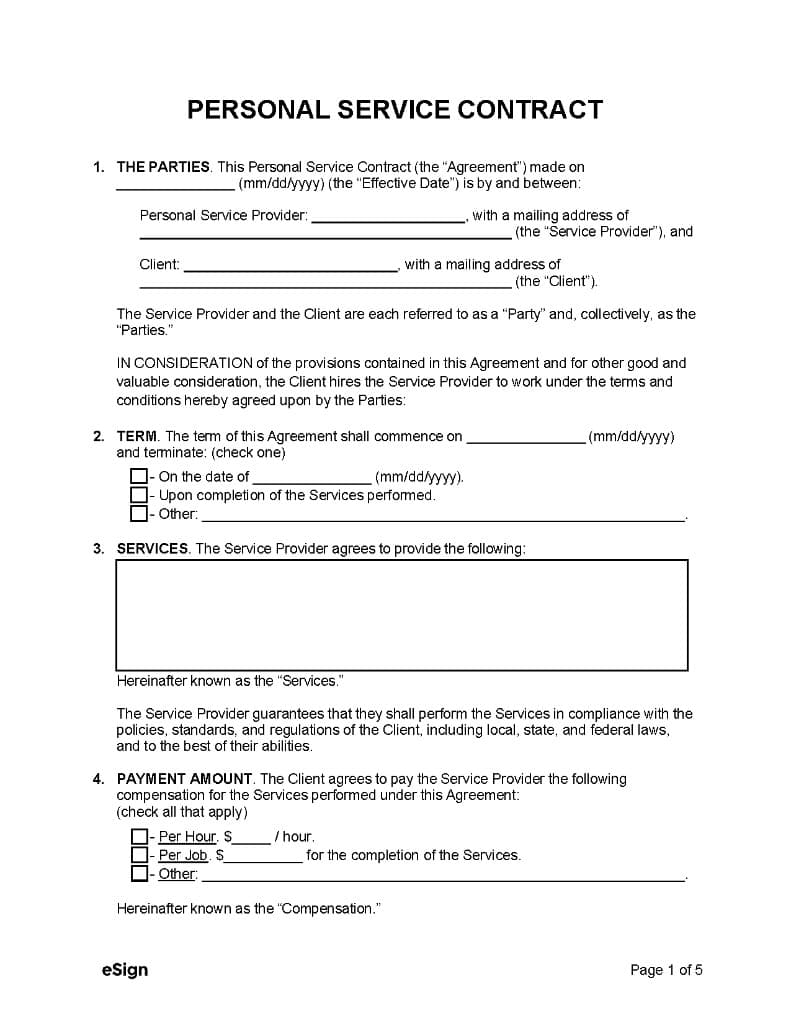
DOCX — document properties
| Property | Value |
|---|---|
| Title | Personal Service Contract |
| Pages (source PDF) | 5 |
| Output format | .docx |
| Styles preserved | Heading 1 (title), Heading 2 (sections), body text |
| Form fields | Underline blanks, date hints (mm/dd/yyyy) |
| Interactive | Checkbox content controls (Term, Payment) |
DOCX — page 1 outline (structure preserved)
| Section | Content in Word |
|---|---|
| Title | PERSONAL SERVICE CONTRACT (centered, bold, uppercase) |
| 1. THE PARTIES | Agreement date blank; Service Provider name & address; Client name & address; Party definitions |
| 2. TERM | Start date blank; three checkbox options (fixed date / completion / other) |
| 3. SERVICES | Large text box for service description; compliance paragraph |
| 4. PAYMENT AMOUNT | Three checkbox options: per hour, per job, other (with amount blanks) |
Sample output
Personal Service Contract.docx

PERSONAL SERVICE CONTRACT

1. THE PARTIES.
This Personal Service Contract (the "Agreement") made on ___________ (mm/dd/yyyy) (the "Effective Date") is by and between:

Personal Service Provider: ___________________________, with a mailing address of ___________________________ (the "Service Provider"), and

Client: ___________________________, with a mailing address of ___________________________ (the "Client").

2. TERM.
The term of this Agreement shall commence on ___________ (mm/dd/yyyy) and terminate: (check one)
☐ On the date of ___________ (mm/dd/yyyy).
☐ Upon completion of the Services performed.
☐ Other: _________________________________________________.

3. SERVICES.
The Service Provider agrees to provide the following:
[multiline text box]
Hereinafter known as the "Services."

4. PAYMENT AMOUNT.
☐ Per Hour. $___________ / hour.
☐ Per Job. $___________ for the completion of the Services.
☐ Other: _________________________________________________.

— Page 1 of 5 —How it works
- 1
Upload your file
Drag it into the browser or send it through the REST API. See the credit cost before you convert.
- 2
Claude reads it
Anthropic’s Claude models extract and restructure the content — context-aware, not just raw OCR text.
- 3
Download clean output
Get exactly the format you chose, and refine it with an AI prompt in seconds if needed.
Frequently asked questions
Is the legal text preserved exactly?
Yes. Content is extracted faithfully; AI adjustments only clean formatting and never add or alter clauses. For scanned contracts, accuracy depends on scan quality.
Can it also produce an archival PDF/A?
Yes — the same source can be exported as an editable DOCX for review and as archival PDF/A for long-term compliance retention.
More conversions
Convert scanned invoices to structured JSON & Excel
Convert identity cards to a CSV row
Convert bank statements to Excel
Convert Excel spreadsheets to Markdown tables
Convert presentations to structured Markdown
Convert handwritten notes and scans to text
Browse all conversion workflows, read the guides, or see the examples gallery.
Start converting in seconds
100 free credits on sign-up. No code, no card, no commitment.
Get started free