
Convert handwritten notes and scans to text
Photos of notebooks, whiteboards, and scan-only PDFs are locked away from search and editing. Scan Hero transcribes cursive and mixed handwriting into clean, readable Markdown you can search, copy, and reuse.
Enable “Describe images” for photos and complex layouts, and use well-lit, in-focus shots for the best results. Large files queue for asynchronous processing.
Example: Handwritten notes & scans → Markdown
Photos of notebooks, whiteboards, and scan-only PDFs—cursive and mixed styles transcribed into clean, readable Markdown.
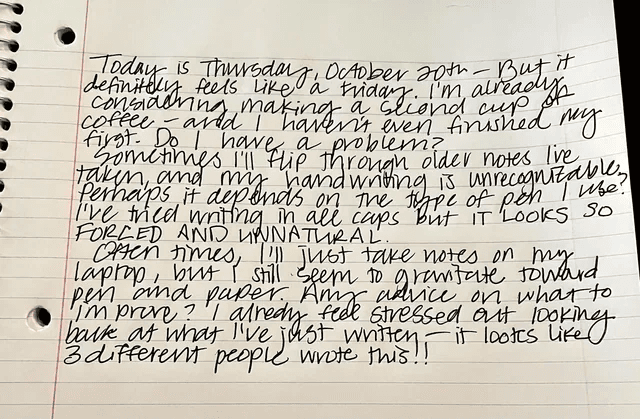
Document metadata
| Field | Value |
|---|---|
| Source | Photo of handwritten notebook page |
| Layout | Lined paper, spiral binding, red margin |
| Paragraphs extracted | 3 |
| Output | Markdown (.md) |
Extracted paragraphs (preview)
| § | Text |
|---|---|
| 1 | Today is Thursday, October 20th – But it definitely feels like a Friday. I'm already considering making a second cup of coffee – and I haven't even finished my first. Do I have a problem? |
| 2 | Sometimes I'll flip through older notes I've taken, and my handwriting is unrecognizable. Perhaps it depends on the type of pen I use? I've tried writing in all caps BUT IT LOOKS SO FORCED AND UNNATURAL. |
| 3 | Often times, I'll just take notes on my laptop, but I still seem to gravitate toward pen and paper. Any advice on what to improve? I already feel stressed out looking back at what I've just written – it looks like 3 different people wrote this!! |
Sample output
# Handwritten notes — page 1

Today is Thursday, October 20th – But it definitely feels like a Friday. I'm already considering making a second cup of coffee – and I haven't even finished my first. Do I have a problem?

Sometimes I'll flip through older notes I've taken, and my handwriting is unrecognizable. Perhaps it depends on the type of pen I use? I've tried writing in all caps BUT IT LOOKS SO FORCED AND UNNATURAL.

Often times, I'll just take notes on my laptop, but I still seem to gravitate toward pen and paper. Any advice on what to improve? I already feel stressed out looking back at what I've just written – it looks like 3 different people wrote this!!How it works
- 1
Upload your file
Drag it into the browser or send it through the REST API. See the credit cost before you convert.
- 2
Claude reads it
Anthropic’s Claude models extract and restructure the content — context-aware, not just raw OCR text.
- 3
Download clean output
Get exactly the format you chose, and refine it with an AI prompt in seconds if needed.
Frequently asked questions
How accurate is handwriting transcription?
Accuracy depends on legibility and image quality. Use well-lit, in-focus photos for best results, and refine any output in seconds with the AI adjustment feature.
Can it read whiteboards and lined-paper notes?
Yes. Claude Vision handles notebook pages, whiteboards, and mixed handwriting styles, transcribing them into paragraphs of Markdown.
More conversions
Convert scanned invoices to structured JSON & Excel
Convert identity cards to a CSV row
Convert bank statements to Excel
Convert contract PDFs to editable Word
Convert Excel spreadsheets to Markdown tables
Convert presentations to structured Markdown
Browse all conversion workflows, read the guides, or see the examples gallery.
Start converting in seconds
100 free credits on sign-up. No code, no card, no commitment.
Get started free