
Convert bank statements to Excel
Multi-page statements with running balances are tedious to rebuild in a spreadsheet. Scan Hero reads scanned or PDF statements and produces a structured Excel workbook: a summary sheet, a full transactions sheet, and a daily-balance sheet — column headers normalised, balances intact.
Drop the file in the browser or send it through the API. Large statements are processed asynchronously and returned the moment they are ready.
Example: Bank statements → Excel tables
Multi-page statements with running balances become organized Excel sheets—summary, transactions, and daily balances on separate tabs.
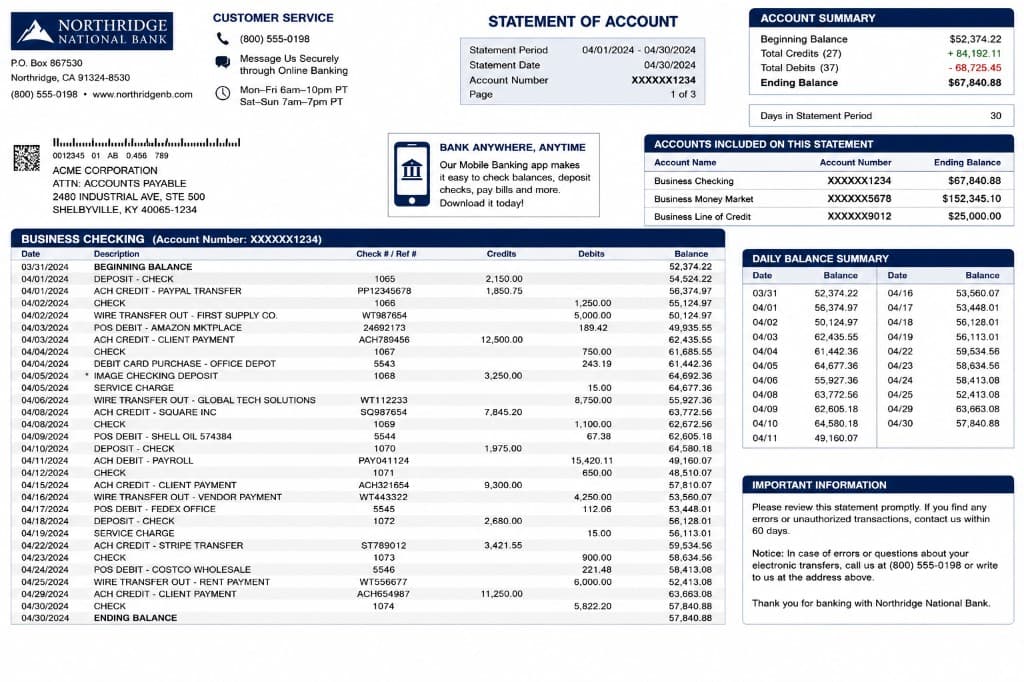
Sheet: Summary — Statement of account
| Field | Value (USD) |
|---|---|
| Bank | Northridge National Bank |
| Client | Acme Corporation |
| Statement period | 04/01/2024 – 04/30/2024 |
| Account number | XXXXXX1234 |
| Beginning balance | 52,374.22 |
| Total credits (27) | 84,192.11 |
| Total debits (37) | 68,725.45 |
| Ending balance | 67,840.88 |
| Days in period | 30 |
Sheet: Transactions — Business checking
| Date | Description | Check / Ref. | Credits | Debits | Balance |
|---|---|---|---|---|---|
| 03/31/2024 | BEGINNING BALANCE | — | — | — | 52,374.22 |
| 04/01/2024 | DEPOSIT — CHECK | 1065 | 2,150.00 | — | 54,524.22 |
| 04/01/2024 | ACH CREDIT — PAYPAL TRANSFER | PP12345678 | 1,850.75 | — | 56,374.97 |
| 04/02/2024 | CHECK | 1066 | — | 1,250.00 | 55,124.97 |
| 04/02/2024 | WIRE TRANSFER OUT — FIRST SUPPLY CO. | WT987654 | — | 5,000.00 | 50,124.97 |
| 04/03/2024 | POS DEBIT — AMAZON MARKETPLACE | 24692173 | — | 189.42 | 49,935.55 |
| 04/03/2024 | ACH CREDIT — CLIENT PAYMENT | ACH789456 | 12,500.00 | — | 62,435.55 |
| 04/04/2024 | SERVICE CHARGE | — | — | 35.00 | 62,400.55 |
| 04/30/2024 | ENDING BALANCE | — | — | — | 67,840.88 |
Sheet: Daily balance
| Date | Balance (USD) |
|---|---|
| 04/01/2024 | 56,374.97 |
| 04/02/2024 | 50,124.97 |
| 04/03/2024 | 62,435.55 |
| 04/15/2024 | 58,210.30 |
| 04/30/2024 | 67,840.88 |
Sample output
Sheet: Summary
bank,Northridge National Bank
client,Acme Corporation
period,2024-04-01..2024-04-30
account,XXXXXX1234
beginning_balance,52374.22
ending_balance,67840.88

Sheet: Transactions
date,description,reference,credits,debits,balance
2024-03-31,BEGINNING BALANCE,,,,52374.22
2024-04-01,DEPOSIT - CHECK,1065,2150.00,,54524.22
2024-04-02,CHECK,1066,,1250.00,55124.97How it works
- 1
Upload your file
Drag it into the browser or send it through the REST API. See the credit cost before you convert.
- 2
Claude reads it
Anthropic’s Claude models extract and restructure the content — context-aware, not just raw OCR text.
- 3
Download clean output
Get exactly the format you chose, and refine it with an AI prompt in seconds if needed.
Frequently asked questions
Are running balances kept accurate?
Yes. Transactions are extracted in order with credits, debits, and the running balance preserved, then written to an Excel sheet with normalised columns.
Can each statement section become its own sheet?
Choose Excel (.xlsx) output and the summary, transactions, and daily balances are split into separate tabs automatically.
More conversions
Convert scanned invoices to structured JSON & Excel
Convert identity cards to a CSV row
Convert contract PDFs to editable Word
Convert Excel spreadsheets to Markdown tables
Convert presentations to structured Markdown
Convert handwritten notes and scans to text
Browse all conversion workflows, read the guides, or see the examples gallery.
Start converting in seconds
100 free credits on sign-up. No code, no card, no commitment.
Get started free